Tuesday, 5 July 2016

मोदी मंत्रिमंडल में बड़े बदलाव: स्मृति ईरानी की HRD से छुट्टी, जानें किसे मिली क्या जिम्मेदारी |


नयी दिल्ली: प्रधानमंत्री नरेंद्र मोदी ने अपने मंत्रिमंडल में 19 नए मंत्रियों को शामिल करने के बाद विभागों में फेरबदल करके सबको चौंका दिया है. स्मृति ईरानी की जगह पर प्रकाश जावड़ेकर को मानव संसाधन विकास मंत्रालय का जिम्मा सौंपा गया है जबकि स्मृति ईरानी अब कपड़ा मंत्रालय का कार्यभार संभालेंगी. केंद्र की नरेंद्र मोदी सरकार के मंत्रिपरिषद विस्तार और फेरबदल के तहत मंगलवार रात स्मृति ईरानी को मानव संसाधन विकास जैसे अहम मंत्रालय से हटाकर कम अहमियत वाले कपडा मंत्रालय की जिम्मेदारी सौंप दी गई.

वहीं केंद्रीय वित्त मंत्री अरुण जेटली ने सूचना एवं प्रसारण मंत्रालय का अतिरिक्त प्रभार छोड दिया है. हैदराबाद में दलित छात्र रोहित वेमुला की खुदकुशी और जेएनयू विवाद जैसे वाकयों की वजह से ईरानी का लगभग दो साल का कार्यकाल विवादों में रहा है. बहरहाल, ईरानी को महत्वहीन समझा जाने वाला कपडा मंत्रालय दिए जाने से यह कयास भी लगाए जा रहे हैं कि कहीं ऐसा इसलिए तो नहीं किया गया कि वह 2017 में होने वाले उत्तर प्रदेश विधानसभा चुनाव में भाजपा के प्रचार का चेहरा बनाए जाने की स्थिति में वह प्रचार के लिए ज्यादा वक्त निकाल सकें. प्रधानमंत्री ने आज अपने मंत्रिपरिषद के विस्तार में 19 नए मंत्रियों को शामिल किया जिनमें भाजपा नेता एस एस आहलूवालिया, एम जे अकबर और विजय गोयल जैसे जानेमाने नाम शामिल हैं.

पर्यावरण राज्य मंत्री (स्वतंत्र प्रभार) प्रकाश जावडेकर को सरकार के इस दूसरे विस्तार में तरक्की देकर कैबिनेट रैंक के मंत्री के तौर पर शपथ दिलाई गई. अकबर को विदेश राज्य मंत्री बनाया गया है. विदेश मंत्रालय में वी के सिंह एक अन्य राज्य मंत्री हैं. शहरी विकास मंत्री एम वैंकैया नायडू को सूचना एवं प्रसारण मंत्रालय का अतिरिक्त प्रभार दिया गया है. हालांकि, उनसे संसदीय कार्य मंत्रालय की जिम्मेदारी वापस ले ली गई है. यह जिम्मेदारी अब रसायन एवं उवर्रक मंत्री अनंत कुमार संभालेंगे. मंत्रिपरिषद में हुए इस फेरबदल में डी वी सदानंद गौडा से कानून एवं न्याय मंत्रालय वापस ले लिया गया. कानून एवं न्याय मंत्रालय का अतिरिक्त प्रभार अब रविशंकर प्रसाद संभालेंगे. गौडा को सांख्यिकी एवं कार्यक्रम क्रियान्वयन मंत्रालय आवंटित किया गया है. जयंत सिन्हा को वित्त राज्य मंत्री के पद से हटाकर नागरिक उड्डयन राज्य मंत्री बनाया गया है. इस पद पर अब तक महेश शर्मा थे. शर्मा अब सिर्फ संस्कृति एवं पर्यटन मंत्रालय की जिम्मेदारी संभालेंगे.

मंत्रिपरिषद में हुए इस फेरबदल में पांच राज्य मंत्रियों को बाहर का रास्ता दिखाया गया. पांच मंत्रियों को हटाने और विस्तार के बाद अब मोदी मंत्रिपरिषद में 78 मंत्री हो गए हैं. कैबिनेट मंत्रियों में चौधरी वीरेंद्र सिंह को ग्रामीण विकास, पंचायती राज और पेयजल एवं स्वच्छता मंत्रालय से हटाकर इस्पात मंत्रालय की जिम्मेदारी दी गई है. ग्रामीण विकास, पंचायती राज और पेयजल एवं स्वच्छता मंत्रालय की जिम्मेदारी अब नरेंद्र सिंह तोमर को दी गई है. वह पहले खदान एवं इस्पात मंत्री थे. अन्य कैबिनेट मंत्रियों और राज्य मंत्रियों के प्रभार में कोई बदलाव नहीं किया गया. बिजली, कोयला एवं अक्षय उर्जा राज्य मंत्री (स्वतंत्र प्रभार) को खदान मंत्रालय का अतिरिक्त प्रभार दिया गया है.

रेल राज्य मंत्री मनोज सिन्हा को संचार राज्य मंत्री (स्वतंत्र प्रभार) की जिम्मेदारी दी गई है जबकि संतोष कुमार गंगवार को जयंत सिन्हा की जगह वित्त मंत्रालय में भेजा गया है. इससे पहले, गंगवार कपडा राज्य मंत्री (स्वतंत्र प्रभार) थे. अर्जुन राम मेघवाल वित्त मंत्रालय में दूसरे राज्य मंत्री होंगे. पर्यावरण राज्य मंत्री (स्वतंत्र प्रभार) की जिम्मेदारी संभाल रहे जावडेकर एकमात्र ऐसे मंत्री रहे जिन्हें कैबिनेट रैंक में तरक्की दी गई, जबकि सभी नए मंत्रियों को राज्य मंत्री के तौर पर शपथ दिलाई गई. इससे पहले, ऐसी अटकलें थीं कि गोयल और वाणिज्य राज्य मंत्री (स्वतंत्र प्रभार) निर्मला सीतारमण को कैबिनेट रैंक में तरक्की दी जाएगी. नए मंत्रियों में विजय गोयल को युवा मामलों एवं खेल मंत्रालय में राज्य मंत्री :स्वतंत्र प्रभार: बनाया गया है. असम के मुख्यमंत्री बनने से पहले इस पद पर सर्वानंद सोनोवाल काबिज थे. अनिल माधव दवे को पर्यावरण मंत्रालय में राज्य मंत्री (स्वतंत्र प्रभार) बनाया गया है. भाजपा की सहयोगी पार्टी अपना दल की नेता अनुप्रिया पटेल को स्वास्थ्य एवं परिवार कल्याण मंत्रालय में राज्य मंत्री (स्वतंत्र प्रभार) बनाया गया है जबकि डॉ. एस आर भामरे को रक्षा राज्य मंत्री बनाया गया है.

आहलूवालिया को कृषि एवं किसान कल्याण मंत्रालय और संसदीय कार्य मंत्रालय में राज्य मंत्री बनाया गया है. अजय टम्टा (उत्तराखंड), अर्जुन राम मेघवाल (राजस्थान), कृष्णा राज (उत्तर प्रदेश), रामदास अठावले (महाराष्ट्र), रमेश सी जीगाजिनगी (कर्नाटक) उन दलित मंत्रियों में शामिल हैं जिन्हें राष्ट्रपति भवन में आज आयोजित एक कार्यक्रम में राष्ट्रपति प्रणब मुखर्जी ने पद एवं गोपनीयता की शपथ दिलाई. शपथ ग्रहण कार्यक्रम में उपराष्ट्रपति हामिद अंसारी, प्रधानमंत्री मोदी और उनके मंत्रिपरिषद के सहकर्मी, भाजपा अध्यक्ष अमित शाह और सहयोगी पार्टियों के नेता मौजूद थे. कांग्रेस का कोई भी नेता इस मौके पर मौजूद नहीं था. जिन अन्य चेहरों को मंत्री बनाया गया उनमें पी पी चौधरी, सी आर चौधरी (राजस्थान), ए एम दवे, फग्गन सिंह कुलस्ते (मध्य प्रदेश), महेंद्र नाथ पांडेय उत्तर प्रदेश) पुरुषोत्तम रुपाला, जे भाभोर और मनसुखभाई मंडाविया (गुजरात), राजेन गोहाईं (असम) और एस आर भामरे (महाराष्ट्र) शामिल हैं. राष्ट्रपति भवन की ओर से जारी एक विज्ञप्ति में कहा गया कि राष्ट्रपति ने सांवर लाल जाट (जल संसाधन), मोहनभाई कल्याणजीभाई कुंदरिया (कृषि), निहाल चंद (पंचायती राज), मनसुखभाई धानजीभाई वासव (जनजातीय मामले) और राम शंकर कठेरिया (एचआरडी) का इस्तीफा स्वीकार कर लिया है.

Friday, 1 July 2016

PHP Operator Precedence

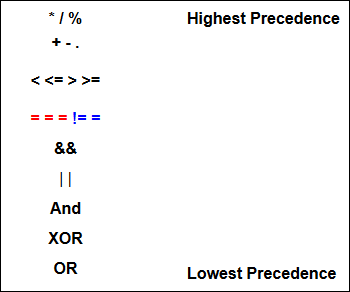
Here's a list of the operators you've met so far, and the order of precedence. This can make a difference, as we saw during the mathematical operators. Don't worry about these too much, unless you're convinced that your math or logical is correct. In which case, you might have to consult the following:
PHP Operator Precedence List
The only operators you haven't yet met on the list above are the = = = and != = operators.
In recent editions of PHP, two new operators have been introduced: the triple equals sign ( = = =) and an exclamation, double equals ( != =). These are used to test if one value has the same as another AND are of the same type. An example would be:
$number = 3;
$text = 'three';
if ($number === $text) {
print("Same");
}
else {
print("Not the same");
}
So this asks, "Do the variables match exactly?" Since one is text and the other is a number, the answer is "no", or false. We won't be using these operators much, if at all!

Ok, if all of that has given you a headache, let's move on to some practical work. In the next section, we'll take a look at HTML forms, and how to get data from them. This is so that we can do other things besides printing to the screen.

PHP Logical Operators

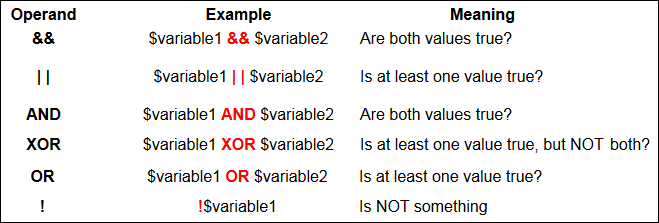
As well as the PHP comparison operators you saw earlier, there's also something called Logical Operators. You typically use these when you want to test more than one condition at a time. For example, you could check to see whether the username and password are correct from the same If Statement. Here's the table of these Operands.
PHP Logic Operators
The new Operands are rather strange, if you're meeting them for the first time. A couple of them even do the same thing! They are very useful, though, so here's a closer look.
The && Operator
The && symbols mean AND. Use this if you need both values to be true, as in our username and password test. After all, you don't want to let people in if they just get the username right but not the password! Here's an example:
$username ='user';
$password ='password';
if ($username =='user' && $password =='password') {
print("Welcome back!");
}
else {
print("Invalid Login Detected");
}
The if statement is set up the same, but notice that now two conditions are being tested:
$username =='user' && $password =='password
This says, "If username is correct AND the password is ok, too, then let them in". Both conditions need to go between the round brackets of your if statement.
The | | Operator
The two straight lines mean OR. Use this symbol when you only need one of your conditions to be true. For example, suppose you want to grant a discount to people if they have spent more than 100 pounds OR they have a special key. Else they don't get any discount. You'd then code like this:
$total_spent =100;
$special_key ='SK12345';
if ($total_spent ==100 | | $special_key =='SK12345') {
print("Discount Granted!");
}
else {
print("No discount for you!");
}
This time we're testing two conditions and only need ONE of them to be true. If either one of them is true, then the code gets executed. If they are both false, then PHP will move on.
AND and OR
These are the same as the first two! AND is the same as && and OR is the same as ||. There is a subtle difference, but as a beginner, you can simply replace this:
$username =='user' && $password =='password
With this
$username =='user' AND $password =='password
And this:
$total_spent ==100 | | $special_key =='SK12345'
With this:
$total_spent ==100 OR $special_key =='SK12345'
It's up to you which you use. AND is a lot easier to read than &&. OR is a lot easier to read than ||.
The difference, incidentally, is to do with Operator Precedence. We touched on this when we discussed variables, earlier. Logical Operators have a pecking order, as well. The full table is coming soon!

XOR
You probably won't need this one too much. But it's used when you want to test if one value of two is true but NOT both. If both values are the same, then PHP sees the expression as false. If they are both different, then the value is true. Suppose you had to pick a winner between two contestants. Only one of them can win. It's an XOR situation!
$contestant_one = true;
$contestant_two = true;
if ($contestant_one XOR $contestant_two) {
print("Only one winner!");
}
else {
print("Both can't win!");
}
See if you can guess which of the two will print out, before running the script.
The ! Operator
This is known as the NOT operator. You use it test whether something is NOT something else. You can also use it to reverse the value of a true or false value. For example, you want to reset a variable to true, if it's been set to false, and vice versa. Here's some code to try:
$test_value = false;
if ($test_value == false) {
print(!$test_value);
}
The code above will print out the number 1! (You'll see why when we tackle Boolean values below.) What we're saying here is, "If $test_value is false then set it to what it's NOT." What it's NOT is true, so it will now get this value. A bit confused? It's a tricky one, but it can come in handy!

PHP Switch Statements

In some earlier code, we tested a single variable that came from a drop-down list. A different picture was displayed on screen, depending on the value inside of the variable. A long list of if and else … if statements were used. A better option, if you have only one variable to test, is to use something called a switch statement. To see how switch statements work, study the following code:
<?php
$picture ='church';
switch ($picture) {
case 'kitten':
print('Kitten Picture');
break;
case 'church':
print('Church Picture');
break;
}
?>
In the code above, we place the direct text "church" into the variable called $picture. It's this direct text that we want to check. We want to know what is inside of the variable, so that we can display the correct picture.
To test a single variable with a Switch Statement, the following syntax is used:
switch ($variable_name) {
case 'What_you_want_to_check_for':
//code here
break;
}
It looks a bit complex, so we'll break it down.
switch ($variable_name) {
You Start with the word 'Switch' then a pair of round brackets. Inside of the round brackets, you type the name of the variable you want to check. After the round brackets, you need a left curly bracket.
case 'What_you_want_to_check_for':
The word 'case' is used before each value you want to check for. In our code, a list of values was coming from a drop-down list. These value were: church and kitten, among others. These are the values we need after the word 'case'. After the the text or variable you want to check for, a colon is needed ( : ).
//code here
After the semi colon on the 'case' line, you type the code you want to execute. Needless to say, you'll get an error if you miss out any semi-colons at the end of your lines of code!
break;
You need to tell PHP to "Break out" of the switch statement. If you don't, PHP will simply drop down to the next case and check that. Use the word 'break' to get out of the Switch statement.

To see the Switch statement in action, there is a file called selectPicture2.php amongst the ones you downloaded (Go here, if you haven't yet downloaded the files for this course). It’s in the scripts folder. Try it out, if you like!
If you look at the last few lines of the Switch Statement in this file, you'll see something else you can add to your own code:
default:
print ("No Image Selected");
The default option is like the else from if … else. It's used when there could be other, unknown, options. A sort of "catch all" option.

Less Than or Equal To, Greater Than or Equal To

We can use the same code you created in the previous section to illustrate "Less Than or Equal To" and "Greater Than or Equal To". Change this line in your code:
$total_spent = 90;
to this:
$total_spent = 100;

Now run your code again. Did anything print?
The reason why nothing printed, and no errors occurred, is because we haven't written any condition logic to test for equality. We're only checking to see if the two variables are either Less Than ( < ) each other, or Greater Than ( > ) each other. We need to check if they are the same (as they now are).
Instead of adding yet another else if part, checking to see if the two totals are equal, we can use the operators <= (Less Than or Equal To) or >=(Greater Than or Equal To). Here's how. Change this line in your code:
else if($total_spent < $discount_total) {
to this:
else if($total_spent <= $discount_total) {
The only thing that's changed is the Less Than or Equal to symbol has been used instead of just the Less Than sign.
Now run your code again. Because we're now saying "If total spent is Less Than or equal to discount total, then execute the code." So the text gets printed to the screen.

Exercise
Suppose you want to apply the discount if 100 pounds or more has been spent. Change your code above to display the correct message. Use the >= symbol for this exercise.

Comparison Operators can take a little getting used, but are well worth the effort. If you're having a hard time with all these Operands, you'll be glad to hear that there's even more of them! Before we get to them, though, let's take a look at another logic technique you can use – the Switch Statement.

PHP Less Than, Greater Than

The Less Than ( < ) and Greater Than ( > ) symbols come in quite handy. They are really useful in loops (which we'll deal with in another section), and for testing numbers in general.
Suppose you wanted to test if someone has spent more than 100 pounds on your site. If they do, you want to give them a ten percent discount. The Less Than and Greater Than symbols can be used. Try this script. Open up your text editor, and type the following. Save your work, and try it out on your server.
<?PHP
$total_spent = 110;
$discount_total = 100;
if ($total_spent > $discount_total) {
print("10 percent discount applies to this order!");
}
?>
By using the Greater Than symbol ( > ), we're saying "If the total spent is greater than the discount total then execute some code."
The Less Than symbol can be used in the same way. Change your script to this (new lines are in bold):
<?PHP
$total_spent = 90;
$discount_total = 100;
if ($total_spent > $discount_total) {
print("10 percent discount applies to this order!");
}
else if($total_spent < $discount_total) {
print("Sorry – No discount!");
}
?>
In the else if part added above, we're checking to see if the total spent is Less Than ( < )100 pounds. If it is, then a new message is display. Notice that the $total_spent variable has been reduced to 90.

There is a problem with scripts such as the ones above, however. In the next part, we'll take a look at the operators for Less Than or Equal To and Greater Than or Equal To.

PHP Not Equal To

In the previous section, you saw what Comparison Operators were. In this lessons, we'll explore the Comparison Operator for Not Equal To: !=.
So open up your text editor, and add the following script:
<?PHP
$correct_username = 'logmein';
$what_visitor_typed = 'logMEin';
if ($what_visitor_typed != $correct_username) {
print("You're not a valid user of this site!");
}
?>
Save your work and try it out. You should be able to guess what it does! But the thing to note here is the new Comparison Operator. Instead of using the double equals sign we’re now using an exclamation mark and a single equals sign. The rest of the If Statement is exactly the same format as you used earlier.
The things you’re trying to compare need to be different before a value of true is returned by PHP. In the second variable ($what_visitor_typed), the letters “ME” are in uppercase; in the first variable, they are in lowercase. So the two are not the same. Because we used the NOT equal to operator, the text will get printed. Change your script to this:
$correct_username = 'logmein';
$what_visitor_typed = 'logmein';
if ($what_visitor_typed != $correct_username) {
print("You're not a valid user of this site!");
}
else {
print("Welcome back, friend!");
}
See if you can figure out what has changed. Before you run the script, what will get printed out?
In the next part, we'll have a look at how to use the Less Than ( < ) and Greater Than ( > ) operators.