Friday, 1 July 2016

PHP Not Equal To

In the previous section, you saw what Comparison Operators were. In this lessons, we'll explore the Comparison Operator for Not Equal To: !=.
So open up your text editor, and add the following script:
<?PHP
$correct_username = 'logmein';
$what_visitor_typed = 'logMEin';
if ($what_visitor_typed != $correct_username) {
print("You're not a valid user of this site!");
}
?>
Save your work and try it out. You should be able to guess what it does! But the thing to note here is the new Comparison Operator. Instead of using the double equals sign we’re now using an exclamation mark and a single equals sign. The rest of the If Statement is exactly the same format as you used earlier.
The things you’re trying to compare need to be different before a value of true is returned by PHP. In the second variable ($what_visitor_typed), the letters “ME” are in uppercase; in the first variable, they are in lowercase. So the two are not the same. Because we used the NOT equal to operator, the text will get printed. Change your script to this:
$correct_username = 'logmein';
$what_visitor_typed = 'logmein';
if ($what_visitor_typed != $correct_username) {
print("You're not a valid user of this site!");
}
else {
print("Welcome back, friend!");
}
See if you can figure out what has changed. Before you run the script, what will get printed out?
In the next part, we'll have a look at how to use the Less Than ( < ) and Greater Than ( > ) operators.

PHP Comparison Operators

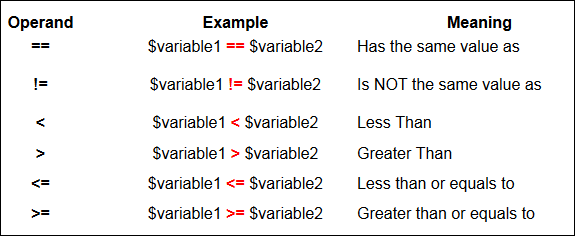
You saw in the last section how to test what is inside of a variable. You used if, else … if, and else. You used the double equals sign (==) to test whether the variable was the same thing as some direct text. The double equals sign is known as a Comparison Operator. There a few more of these “operands” to get used. Here’s a list. Take a look, and then we’ll see a few examples of how to use them.
PHP Comparison Operators
Here's some more information on the above Operands.
== (Has the same value as)
The double equals sign can mean “Has a value of” or "Has the same value as”. In the example below, the variable called $variable1 is being compared to the variable called $variable2
if ($variable1 == $variable2) {
}
!= (Is NOT the same value as)
You can also test if one condition is NOT the same as another. In which case, you need the exclamation mark/equals sign combination ( != ). If you were testing for a genuine username, for example, you could say:
if ($what_user_entered != $username) {
print("You're not a valid user of this site!");
}
The above code says, “If what the user entered is NOT the same as the value in the variable called $username then print something out.
< (Less Than)
You'll want to test if one value is less than another. Use the left angle bracket for this ( < )
> (Greater Than)
You'll also want to test if one value is greater than another. Use the right angle bracket for this ( > )
<= (Less than or equals to)
For a little more precision, you can test to see if one variable is less than or equal to another. Use the left angle bracket followed by the equals sign ( <= )
>= (Greater than or equals to)
If you need to test if one variable is greater than or equal to another, use the right angle bracket followed by the equals sign ( >= )

PHP if ... else if Statements

You can also add “else if” parts to the If Statements you've been exploring in the previous sections. The syntax is this:
else if (another_condition_to_test) {
}
Change your code to this, to see how else if works:
<?PHP
$kitten_image = 1;
$church_image = 0;
if ($kitten_image == 1) {
print ("<IMG SRC =images/kitten.jpg>");
}
else if ($church_image == 1) {
print ("<IMG SRC =images/church.jpg>");
}
else {
print ("No value of 1 detected");
}
?>
Here’s we’re just testing to see which of our variables holds a value of 1. But notice the “else if” lines (and that there’s a space between else and if):
else if ($church_image == 1) {
print ("<IMG SRC =images/church.jpg>");
}
What you’re saying is “If the previous if statement isn’t true, then try this one.” PHP will then try to evaluate the new condition. If it’s true (the $church_image variable holds a value of 1), then the code between the new curly brackets gets executes. If it’s false (the $church_image variable does NOT holds a value of 1), then the line of code will be ignored, and PHP will move on.
To catch any other eventualities, we have an “else” part at the end. Notice that all parts (if, else if, and else) are neatly sectioned of with pairs of curly brackets:
if ($kitten_image == 1) {
}
else if ($church_image == 1) {
}
else {
}
You can add as many else if parts as you like, one for each condition that you want to test. But change your two variables from this:
$kitten_image = 1;
$church_image = 0;
to this:
$kitten_image = 0;
$church_image = 0;
Then run your code again. What do you expect to happen?
As a nice example of if statements, there is a file called “selectPicture.php” in the files that you downloaded. It’s in the scripts folder. Copy this to your own www (root) folder. As long as you have all the images mentioned in the script, they should display. But examine the code for the script (ignore the HTML form tags for now). What it does is to display an image, based on what the user selected from a drop down list. If statements are being used to test what is inside of a single variable.
Don’t worry too much about the rest of the code: concentrate on the if statements. All we’re doing is testing what is inside of the variable called $picture. We’re then displaying the image that corresponds to the word held in the variable.

if ... else Statements in PHP

Instead of using two if statements, as in the previous lesson, we can use an if ... else statement. Like this:
<?PHP
$kitten_image = 0;
$church_image = 1;
if ($kitten_image == 1) {
print ("<IMG SRC =images/kitten.jpg>");
}
else {
print ("<IMG SRC =images/church.jpg>");
}
?>
Copy this new script, save your work, and try it out. You should find that the church image displays in the browser. This time, an if … else statement is being used. Let’s see how it works.
The syntax for the if else statement is this:
if (condition_to_test) {
}
else {
}
If you look at it closely, you’ll see that you have a normal If Statement first, followed by an “else” part after it. Here’s the “else” part:
else {
}
Again, the left and right curly brackets are used. In between the curly brackets, you type the code you want to execute. In our code, we set up two variables:
$kitten_image = 0;
$church_image = 1;
The variable called $kitten_image has been assigned a value of 0, and the variable called $church_image has been assigned a value of 1. The first line of the if statement tests to see what is inside of the variable called $kitten_image. It’s testing to see whether this variable has a value of 1.
if ($kitten_image == 1) {
What we’re asking is: “Is it true that $kitten_image holds a value of 1?” The variable $kitten_image holds a value of 0, so PHP sees this as not true. Because a value of “not true” has been returned (false, if you like), PHP ignores the line of code for the if statement. Instead, it will execute the code for the “else” part. It doesn’t need to do any testing – else means “when all other options have been exhausted, run the code between the else curly brackets.“ For us, that was this:
else {
print ("<IMG SRC =images/church.jpg>");
}
So the church image gets displayed. Change your two variables from this:
$kitten_image = 0;
$church_image = 1;
To this:
$kitten_image = 1;
$church_image = 0;
Run your code again and watch what happens. You should see the kitten! But can you work out why?

Some Practise with PHP If Statements

We can use an if statement to display our image, from the previous section. If the user selected "church", then display the church image. If the user selected "kitten", then display another image (the kitten image, which is also in your images folder). Here's some code:
<?PHP
$kitten_image = 1;
$church_image = 0;
if ($kitten_image == 1) {
print ("<IMG SRC =images/kitten.jpg>");
}
?>
Type that out, and save it as testImages.php. (Notice how there's no HTML!)
When you run the script, the kitten image should display. Let's look at the code and see what's happening.
The first two lines just set up some variables:
$kitten_image = 1;
$church_image = 0;
A value of 1 has been assigned to the variable called $kitten_image. A value of 0 has been assigned to the variable called $church_image. Then we have our if statement. Here it is without the print statement:
if ($kitten_image == 1) {
}
Notice how there's no semi-colon at the end of the first line - you don't need one. After the word "if" we have a round bracket. Then comes our variable name: $kitten_image. We want to test what's inside of this variable. Specifically, we want to test if it has a value of 1. So we need the double equals sign (==). The double equals sign doesn’t really mean “equals”. It means “has a value of”.
What we want to say is:
"If the variable called $kitten_image has a value of 1 then execute some code."
To complete the first line of the if statement we have another round bracket, and a left curly bracket. Miss any of these out, and you'll probably get the dreaded parse error!
The code we want to execute, though, is the print statement, so that our kitten image will display. This goes inside of the if statement:
if ($kitten_image == 1) {
print ("<IMG SRC =images/kitten.jpg>");
}
You need the semi-colon at the end of the print statement.
But if your if statement only runs to one line, you can just do this:
if ($kitten_image == 1) { print ("<IMG SRC = images/kitten.jpg>"); }
In other words, keep everything on one line. PHP doesn't care about your spaces, so it's perfectly acceptable code. Not very readable, but acceptable!
To make use of the church image, here's some new code to try:
<?PHP
$kitten_image = 0;
$church_image = 1;
if ($kitten_image == 1) {
print ("<IMG SRC =images/kitten.jpg>");
}
if ($church_image == 1) {
print ("<IMG SRC =images/church.jpg>");
}
?>
Notice that the $kitten_image variable now has a value of 0 and that $church_image is 1. The new if statement is just the same as the first. When you run the script, however, the church image will display. That's because of this line:
if ($kitten_image == 1) {
That says, "If the variable called $kitten_image has a value of 1 ... ". PHP doesn't bother reading the rest of the if statement, because $kitten_image has a value of 0. It will jump down to our second if statement and test that:
if ($church_image == 1) {
Since the variable called $church_image does indeed have a value of 1, then the code inside of the if statement gets executed. That code prints out the HTML for the church image:
print ("<IMG SRC =images/church.jpg>");

PHP If Statements

You saw in the last section that variables are storage areas for your text and numbers. But the reason you are storing this information is so that you can do something with them. If you have stored a username in a variable, for example, you'll then need to check if this is a valid username. To help you do the checking, something called Conditional Logic comes in very handy indeed. In this section, we'll take a look at just what Conditional Logic is. In the next section, we'll do some practical work.

Conditional Logic

Conditional Logic is all about asking "What happens IF ... ". When you press a button labelled "Don't Press this Button - Under any circumstance!" you are using Conditional Logic. You are asking, "Well, what happens IF I do press the button?"
You use Conditional Logic in your daily life all the time:
"If I turn the volume up on my stereo, will the neighbours be pleased?"
"If spend all my money on a new pair of shoes, will it make me happy?"
"If I study this course, will it improve my web site?"
Conditional Logic uses the "IF" word a lot. For the most part, you use Conditional Logic to test what is inside of a variable. You can then makes decisions based on what is inside of the variable. As an example, think about the username again. You might have a variable like this:
$User_Name = "My_Regular_Visitor";
The text "My_Regular_Visitor" will then be stored inside of the variable called $User_Name. You would use some Conditional Logic to test whether or not the variable $User_Name really does contain one of your regular visitors. You want to ask:
"IF $User_Name is authentic, then let $User_Name have access to the site."
In PHP, you use the "IF" word like this:
if ($User_Name == "authentic") {
//Code to let user access the site here;
}
Without any checking, the if statement looks like this:
if ( ) {
}
You can see it more clearly, here. To test a variable or condition, you start with the word "if". You then have a pair of round brackets. You also need some more brackets - curly ones. These are just to the right of the letter "P" on your keyboard (Well, a UK keyboard, anyway). You need the left curly bracket first { and then the right curly bracket } at the end of your if statement. Get them the wrong way round, and PHP refuses to work. This will get you an error:
if ($User_Name = = "authentic") }
//Code to Let user access the site here;
{
And so will this:
if ($User_Name == "authentic") {
//Code to Let user access the site here;
{
The first one has the curly brackets the wrong way round (should be left then right), while the second one has two left curly brackets.
In between the two round brackets, you type the condition you want to test. In the example above, we're testing to see whether the variable called $User_Name has a value of "authentic":
($User_Name = = "authentic")
Again, you'll get an error if you don't get your round brackets right! So the syntax for the if statement is this:
if (Condition_or_Variable_to_test) {
//your code here;
}
In the next lesson, we'll use if statements to display an image on the page.
We'll use the print statement to "print out" HTML code. As an example, take the following HTML code to display an image:
<IMG SRC =church.jpg>
Just plain HTML. But you can put that code inside of the print statement:
print ("<IMG SRC =images/church.jpg>");
When you run the code, the image should display. Of course, you'll need an image called church.jpg, and in a folder called images.
You can find these amongst the files you can download for this course, in the folder called images. (Go here to get the course files, if you haven't already.)
Copy the images folder to your www (root) directory. Then try the following script:
<?PHP
print ("<IMG SRC =images/church.jpg>");
?>
Save your script to the same folder as the images folder (though NOT inside the images folder). Now fire up your server, and give it a try. Hopefully, you'll see the church image display, as in the following graphic:

PHP Variables

A variable is just a storage area. You put things into your storage areas (variables) so that you can use and manipulate them in your programmes. Things you'll want to store are numbers and text.
If you're ok with the idea of variables, then you can move on. If not, think of them like this. Suppose you want to catalogue your clothing collection. You enlist two people to help you, a man and a woman. These two people are going to be your storage areas. They are going to hold things for you, while you tally up what you own. The man and the woman, then, are variables.
You count how many coats you have, and then give these to the man. You count how many shoes you have, and give these to the woman. Unfortunately, you have a bad memory. The question is, which one of your people (variables) holds the coats and which one holds the shoes? To help you remember, you can give your people names! You could call them something like this:
mr_coats
mrs_shoes
But it's entirely up to you what names you give your people (variables). If you like, they could be called this:
man_coats
woman_shoes
Or
HimCoats
HerShoes
But because your memory is bad, it's best to give them names that help you remember what it is they are holding for you. (There are some things your people balk at being called. You can't begin their names with an underscore (_), or a number. But most other characters are fine.)
OK, so your people (variables) now have name. But it's no good just giving them a name. They are going to be doing some work for you, so you need to tell them what they will be doing. The man is going to be holding the coats. But we can specify how many coats he will be holding. If you have ten coats to give him, then you do the "telling" like this:
mr_coats = 10
So, the variable name comes first, then an equals sign. After the equals sign, you tell your variable what it will be doing. Holding the number 10, in our case. (The equals sign, by the way, is not really an equals sign. It's called an assignment operator. But don't worry about it, at this stage. Just remember that you need the equals sign to store things in your variables.)
However, you're learning PHP, so there's something missing. Two things, actually. First, your people (variables) need a dollar sign at the beginning (people are like that). So it would be this:
$mr_coats = 10
If you miss the dollar sign out, then your people will refuse to work! But the other thing missing is something really picky and fussy - a semi-colon. Lines of code in PHP need a semi-colon at the end:
$mr_coats = 10;
If you get any parse errors when you try to run your code, the first thing to check is if you've missed the semi-colon off the end. It's very easy to do, and can be frustrating. The next thing to check is if you've missed out a dollar sign. But back to our people (variables).
So the man is holding ten coats. We can do the same thing with the other person (variable):
$mrs_shoes = 25;
So, $mrs_shoes is holding a value of 25. If we then wanted to add up how many items of clothes we have so far, we could set up a new variable (Note the dollar sign at the begining of the new variable):
$total_clothes
We can then add up the coats and the shoes. You add up in PHP like this:
$total_clothes = $mr_coats + $mrs_shoes;
Remember, $mr_coats is holding a value of 10, and $mrs_shoes is holding a value of 25. If you use a plus sign, PHP thinks you want to add up. So it will work out the total for you. The answer will then get stored in our new variable, the one we've called $total_clothes. You can also add up like this:
$total_clothes = 10 + 35;
Again, PHP will see the plus sign and add the two together for you. Of course, you can add up more than two items:
$total_clothes = 10 + 35 + 7 + 38 + 1250;
But the idea is the same - PHP will see plus signs and then add things up. The answer is then stored in your variable name, the one to the left of the equals sign.